Built for worship teams

Build your Ableton
setlist in minutes,
not hours.

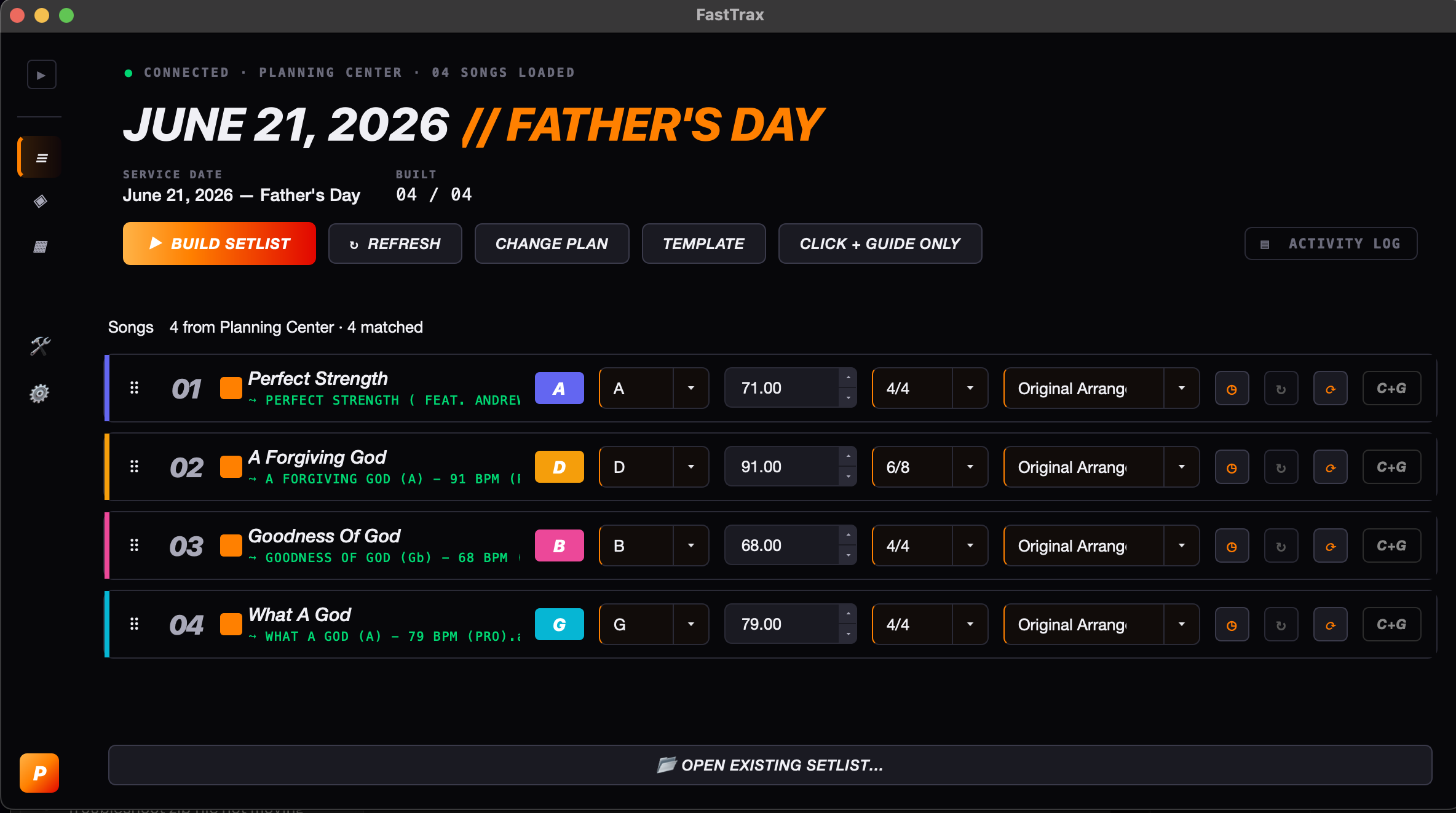
FastTrax pulls your Planning Center plan, matches every song to your stems, and drops a ready-to-run Ableton session on your desktop. Sunday prep just got its weekday back.

Mac · One-time price · Free updates for life
FastTrax app — setlist builder
See it in action

Watch it work. Pick your view.

Starter

Just the Basics

No template? Little experience? No problem! Starter will get you up and running in seconds and help you learn and get comfortable with building sessions every week!

Pro

Built for more

Multiple campuses? Multiple gigs in one day? We got you covered! Upload your own templates, individual song sessions, routing presets for different venues — even build without a PCO plan! Create more with Pro!

What’s inside

Everything you need. Nothing you don’t.

Click any card to see how it works.

PC

Planning Center sync

Read live plans, song lists, keys, tempos, and arrangements — no copy-pasting.

tap to see how →
MT

MultiTracks-ready

Drop your existing stems library in and FastTrax handles the file matching.

tap to see how →
SE

Smart section editor

AI-detected verses, choruses, bridges, and tags. Edit them once per song — FastTrax saves those edits and loads them every time you build.

tap to see how →
CG

Click + Guide only mode

Full mix one week, in-ears-only the next. Toggle per song or flip the whole set at once.

tap to see how →
TM

Multiple templates Pro

Run Ableton Is Confusing, From Studio to Stage, or your own custom template. Each one keeps its own folders, routing, and track mappings.

tap to see how →
CS

Build without Planning Center Pro

Drag songs from your library, set the order, pick keys, hit Build. No PCO required.

tap to see how →
How it works

The old way

Every Sunday’s set used to cost you a weekday.

You know the drill. The plan drops Thursday. By Saturday you’re still chasing files, fixing keys, and wiring stems by hand. There’s a better way.

×

Hours wasted in Ableton

Dragging stems, renaming tracks, lining up clicks. Every week. For every song.

×

Plans that change last-minute

A song gets swapped Saturday night. You rebuild the whole session from scratch.

×

Sections marked by hand

Verse, chorus, tag, bridge — labeling everything manually so the band knows what’s next.

×

No room for the actual creative

By the time the session’s done, the worship moment hasn’t even been thought about yet.

How it works

Three steps. That’s it.

FastTrax handles the busywork so you can focus on leading worship.

Sync your plan

FastTrax connects to Planning Center, pulls your plan, and knows exactly which songs you’re playing, in which keys, at what tempo.

Match your stems

It scans your MultiTracks library, lines every song up to the right stems, and lets you fine-tune sections with the built-in editor.

Hit build

Out comes a clean .als file — clicks, guides, stems, section markers, all in place. Open in Ableton and you’re ready for Sunday.

Pricing

One price. Yours forever.

No subscriptions. Free updates. Founding-member pricing while we’re new.

Now available Click below to grab your copy — checkout is powered by Paddle, downloads ship instantly to your inbox.
Starter
$199 one-time
FOUNDING MEMBER · 25 SPOTS

For teams just dipping into multitrack — get a clean Click + Guide build going fast.

  • Planning Center sync
  • MultiTracks stem matching
  • Smart section editor
  • Click + Guide only mode
  • Default FastTrax Template
Custom Build
$499+ starting at
BY APPOINTMENT

For churches and organizations that want FastTrax wired into their exact Ableton template — built and branded for you.

  • Everything in Pro
  • Your template, mapped end-to-end
  • Custom branding (logo, colors, naming)
  • Bespoke track roles & routing
  • 1-on-1 onboarding for your team
  • Delivery typically in 7–10 days
Book a discovery call
FAQ

Answers, fast.

Does FastTrax work with my church’s setup?

If you use Planning Center for service planning and Ableton Live for tracks, you’re set. FastTrax reads your existing folders and templates — you don’t change a thing about your workflow.

Which Ableton templates does it support?

FastTrax works with any Ableton template — Ableton Is Confusing, From Studio to Stage, or your own custom setup. Each template keeps its own folders, routing, and track mappings.

Do I need MultiTracks stems?

Yes — FastTrax matches your Planning Center songs to stem files in your local library. It works with MultiTracks.com stems, Loop Community stems, or any properly named stems folder.

What Mac do I need?

FastTrax requires an Apple Silicon Mac (M1 or later). All builds are notarized by Apple — no Privacy & Security workaround on install. Intel Mac support is coming soon.

What happens after I reserve my spot?

We’ll email you as soon as the store goes live with a direct checkout link at your founding member price. No payment is collected now.

Founding Member · Pro

Reserve your spot

We’re opening to the first 25 churches at founding member pricing. Drop your info — we’ll follow up when checkout goes live.

No payment now · We’ll reach out when the store opens

You’re on the list.

We’ll reach out as soon as checkout goes live. Keep an eye on your inbox.